 English
  Deutsch
  Español
  Italiano
  Български
  简体中文
简体中文  Polski
  Nederlands
  Dansk
Dansk  Svenska
  Français
  Português
  Ελληνικά
  Català
  Română
  Suomi
Suomi  Čeština
  Magyar
The world’s most advanced accessibility scanner
Static scanners read your markup. Our AI drives your site.
Every competitor runs the same static rule set against your DOM. QualiBooth Deep Scan is an AI agent: it opens a real browser, tabs through your pages, decides which controls are worth provoking, opens your modals, and measures what a keyboard user actually gets - with the screenshot to prove it.
- 12 AI checks
- no static tool can run
- Evidence attached
- a measurement and a screenshot
See Deep Scan in action
Watch a scan run on a live site and see the screenshot evidence behind each finding.
The part nobody was scanning
Automated coverage stopped improving. So we put an AI agent on the page instead.
Static analysis reads the DOM and the CSS and reasons about what should happen. It is genuinely good at that - and it is why every accessibility tool on the market finds broadly the same issues on your site. The defects it structurally cannot see are the ones that only exist while the page is running. Until now, finding those meant putting a person on the page. Deep Scan sends an agent instead - to every page, on every run.
What every static scanner sees
A snapshot of the markup, at rest.
- This button has no accessible name.
- This text is 3.1:1 against its declared background colour.
- This ARIA attribute is not allowed on this role.
- Text over a photograph - needs review. A human should look at this.
What the Deep Scan agent measures
A real browser, AI-driven, with the clock running.
- The focus ring is zero pixels different from unfocused. outline:none won.
- The white heading is 2.8:1 against the pixels actually behind it.
- Tab reaches this control, then the sticky consent bar covers all of it.
- Escape closes the dialog, but focus lands on the body, not the trigger.
The check list
Twelve checks that need a running page
The agent decides what is worth exploring; every check then measures rather than infers. Each finding carries the number it measured, the threshold it crossed, and - for most checks - the screenshot of the moment it happened.
- 01
Focus visibility
Screenshots each control focused and unfocused and compares the pixels. It never reads your CSS: outline:none followed by a :focus-visible rule is a pass, and only the pixels know.
WCAG 2.4.7 WCAG 2.4.13
- 02
Focus obstruction
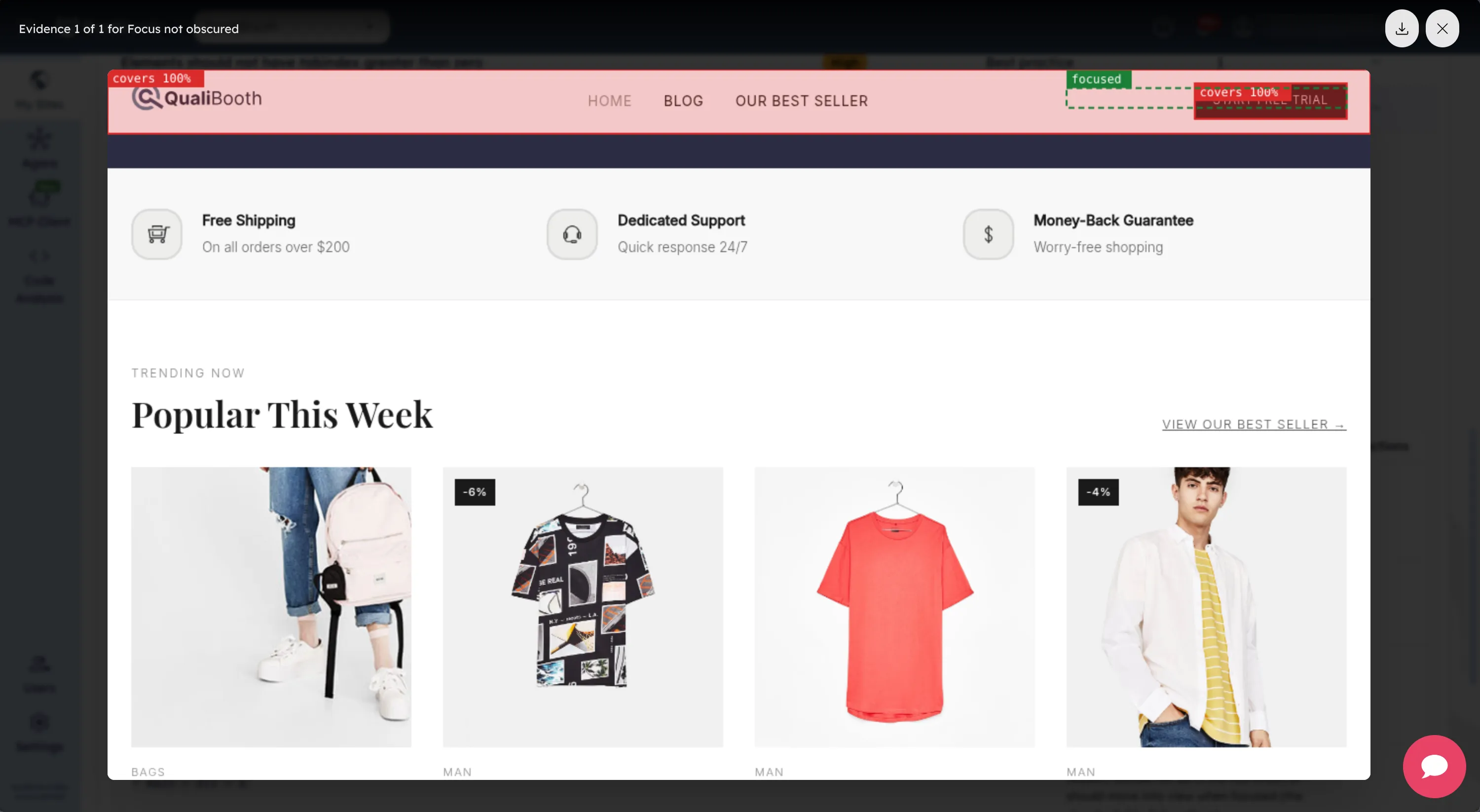
Hit-tests the focused control and measures how much of it your sticky header or cookie bar paints over. Runs in both tab directions, because each one strands a different control.
WCAG 2.4.11 WCAG 2.4.12
- 03
Tab order
Walks the real tab sequence and compares it against DOM order and against visual reading order, with a numbered screenshot of the path it took.
WCAG 2.4.3
- 04
Keyboard traps
Finds focus cycles that leave the rest of the page unreachable. A modal that confines Tab and releases on Escape is correct behaviour, and is not reported.
WCAG 2.1.2
- 05
Modal lifecycle
Opens every dialog and asserts the whole contract in order: focus enters, Tab stays in, the background leaves the accessibility tree, Escape closes, focus returns to the trigger.
WCAG 2.1.2 WCAG 2.4.3 WCAG 4.1.2
- 06
Live announcements
Reconstructs when each live region came into existence relative to its content - catching the toast that was created already holding its message, and therefore announced nothing.
WCAG 4.1.3
- 07
Hover and focus content
Scripts all three requirements for tooltips and popovers: the pointer can travel into the content, Escape dismisses it without moving the pointer, and it does not hide itself.
WCAG 1.4.13 WCAG 2.1.1
- 08
Contrast over imagery
Captures the text, captures the same region with the glyphs made transparent, and compares each glyph pixel against the background actually behind it. This is the population static tools mark needs review.
WCAG 1.4.3
- 09
Reflow at 320px
Renders the page at 320 CSS pixels and names the outermost elements still forcing horizontal scroll, exempting content that lives in its own scroll region.
WCAG 1.4.10
- 10
Text spacing
Applies the spacing the criterion demands and compares the geometry before and after: text clipped by fixed-size boxes, blocks that have collided.
WCAG 1.4.12
- 11
Forced colours
Emulates Windows High Contrast mode and measures each small graphic against its own surroundings, before and after, to find the icons that vanish.
WCAG 1.4.11
- 12
Accessible names
Uses Chrome’s own name computation and its source list: names that hide the visible label, names duplicated by their description, references that resolve to nothing.
WCAG 2.5.3 WCAG 4.1.2
No static scanner on the market can run a single one of these twelve checks. That is what makes QualiBooth the world’s most advanced accessibility scanner - and why it finds what everyone else hands you as a clean report.
Evidence, not opinions
Every finding survives an argument with a developer
The hard part of an accessibility finding is not detecting it. It is being believed at the stand-up three days later. So every Deep Scan finding reports the measurement it took, the threshold it compared that against, and the annotated screenshot of the moment it happened.
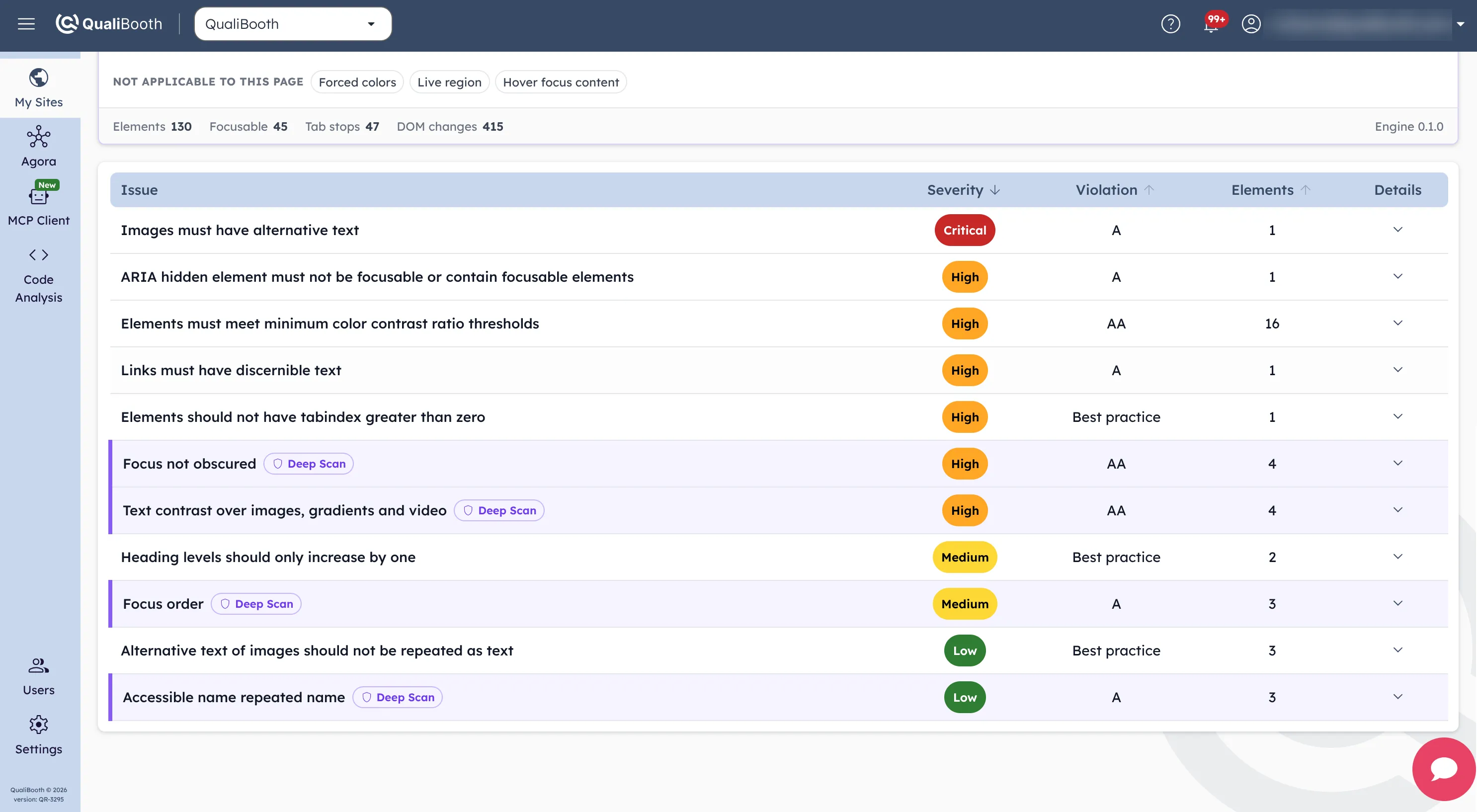
- A measured number inside the sentence - entirely covered by the fixed consent bar, not may be obscured.
- The exact WCAG 2.2 success criterion, linked to its Understanding page.
- Remediation written for that finding, not for the rule in general.
- Anything the engine could not reach a verdict on is reported as such, never as a pass.
Manual QA, on every scan
The keyboard pass your team runs before release - now run by an agent on every page, every night
These are not new requirements. They are the checks a good accessibility tester already does by hand, which is exactly why they get done on five pages before a release and on none of them afterwards.
-
The manual pass
Deep Scan
-
Tab through the page and watch for the focus ring
Screenshots every tab stop focused and unfocused, and diffs the pixels
-
Open each modal, press Escape, see where focus lands
Opens every dialog and asserts the full contract, in order
-
Trigger a toast and listen with a screen reader
Records when each live region existed relative to its content
-
Zoom to 320px and hunt for horizontal scroll
Renders at 320px and names the elements forcing it
-
Squint at the white text on the hero photograph
Compares each glyph pixel against the background behind it
What it will not touch
The engine clicks a bounded set of controls to make your page do something. It will not click anything whose accessible name reads like delete, remove, sign out, unsubscribe, pay, checkout, place order, publish or archive. Scanning your site must never place an order or delete a record - even though clicking more would surface more findings.
How it runs
An AI agent driving a second browser, alongside the static engine, in the same scan.
- 01
The agent takes the wheel
A second Chromium runs beside the static engine on the same authenticated session, driven by the agent - so the pages behind your login are measured too.
- 02
Desktop and mobile
Every URL is measured at 1280×720 and again at 375×667. A focus ring that survives your desktop header often loses to the mobile one.
- 03
One merged report
Behavioural findings arrive in the same list as the static ones, badged Deep Scan and sorted by severity. There is nothing new to learn.
- 04
Evidence kept with the run
Annotated screenshots are stored alongside the scan, so a finding from three months ago still shows its proof when you go back to it.
In your report
Badged, counted, and never silently absent
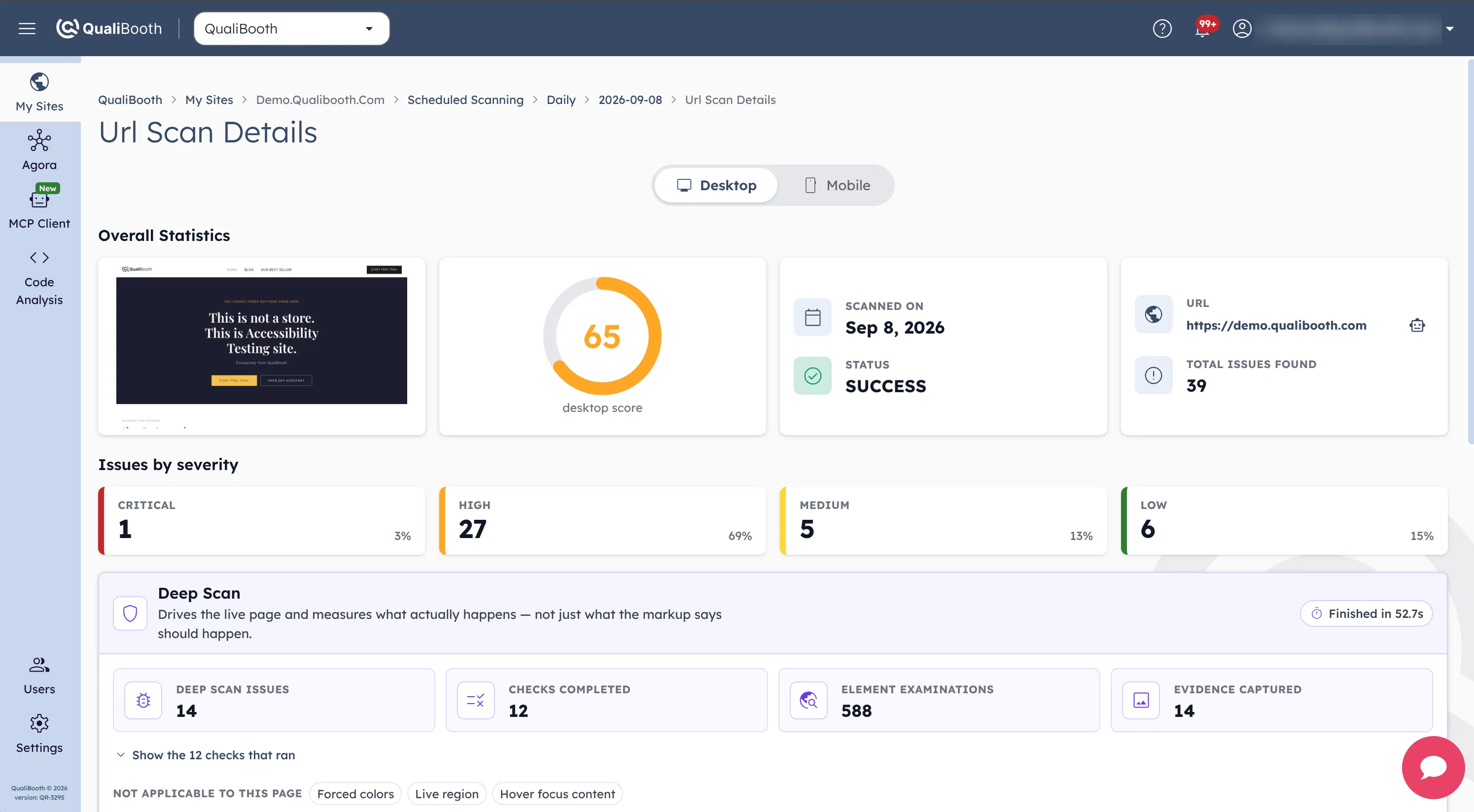
Deep Scan findings are called out rather than folded in quietly - they are the ones your current tool cannot produce. And an absence of findings is a result too, so every report states what was examined and what could not be reached.
- A Deep Scan badge on every behavioural finding in the issue list.
- Checks completed, element examinations and evidence captured, per URL.
- Anything that could not be fully checked, named together with the reason.
- Exported to CSV and JSON with the rest of the scan run.
- 12
- behavioural checks
- 15
- WCAG 2.2 criteria
- 2
- viewports per URL
- 100%
- findings with a measurement
Questions we get asked
- How is this different from an accessibility overlay?
- Completely. An overlay injects JavaScript into your live site and tries to patch accessibility from the outside, usually making it worse. Deep Scan changes nothing about your site - it is an agent that visits it the way a user would, measures, and reports what it found.
- Does this replace manual accessibility testing?
- No, and we would not claim it does. The agent automates the mechanical half of a manual pass - the keyboard sweep, the modal contract, the 320px reflow - so your testers and our auditors spend their time on judgement instead: whether the reading order makes sense, whether the alt text is true, whether the flow is actually usable with a screen reader.
- Can it break anything on my site?
- It interacts with a bounded, filtered set of controls and never with anything that reads as destructive or transactional. No deleting, no signing out, no checkout. It is a read-mostly visit from one browser.
- Can it scan pages behind a login?
- Yes. The agent reuses the authenticated session the scan has already established, so anything your scan can reach, it can measure.
- Why did my accessibility score change when this was switched on?
- Deep Scan adds both new findings and new passes to the score, so a score computed with them is not comparable with one computed without. Scores stay comparable within a scan programme and across runs made with the same setting - we do not flip it mid-programme underneath you.
- What is the AI actually doing?
- Deciding, and then proving. The agent explores your page the way a tester would - choosing which controls are worth provoking, which dialogs to open, how far to push before it stops - and every call it makes is backed by a measurement and a screenshot rather than a guess. That is the deliberate design: autonomous where a person would be slow, and evidence-backed where a language model on its own would be unreliable.
- Why do you call QualiBooth the world’s most advanced accessibility scanner?
- Because no other scanner measures behaviour on a running page. Every tool on the market reads your markup and infers - QualiBooth does that too, and then puts an AI agent on the page for twelve further checks no static engine can produce, each one backed by a measurement and a screenshot. That combination exists nowhere else.
Find out what your current scanner has been missing
Run a free scan, or let us point the Deep Scan agent at the user journey that matters most to your business.