 English
 Deutsch
 Español
 Italiano
 Български
 简体中文
 Polski
 Nederlands
 Dansk
 Svenska
 Français
 Português
 Ελληνικά
 Català
 Română
 Suomi
 Čeština
 Magyar

PDF accessibility software
AI-Powered PDF Remediation
Automatically detect, fix, and validate PDF accessibility issues with AI. Transform inaccessible PDFs into properly structured, accessible documents - without weeks of manual remediation.
- Validated with veraPDF
- the industry-standard PDF/UA checker
- 1 credit = 1 page
- pay only for what you process
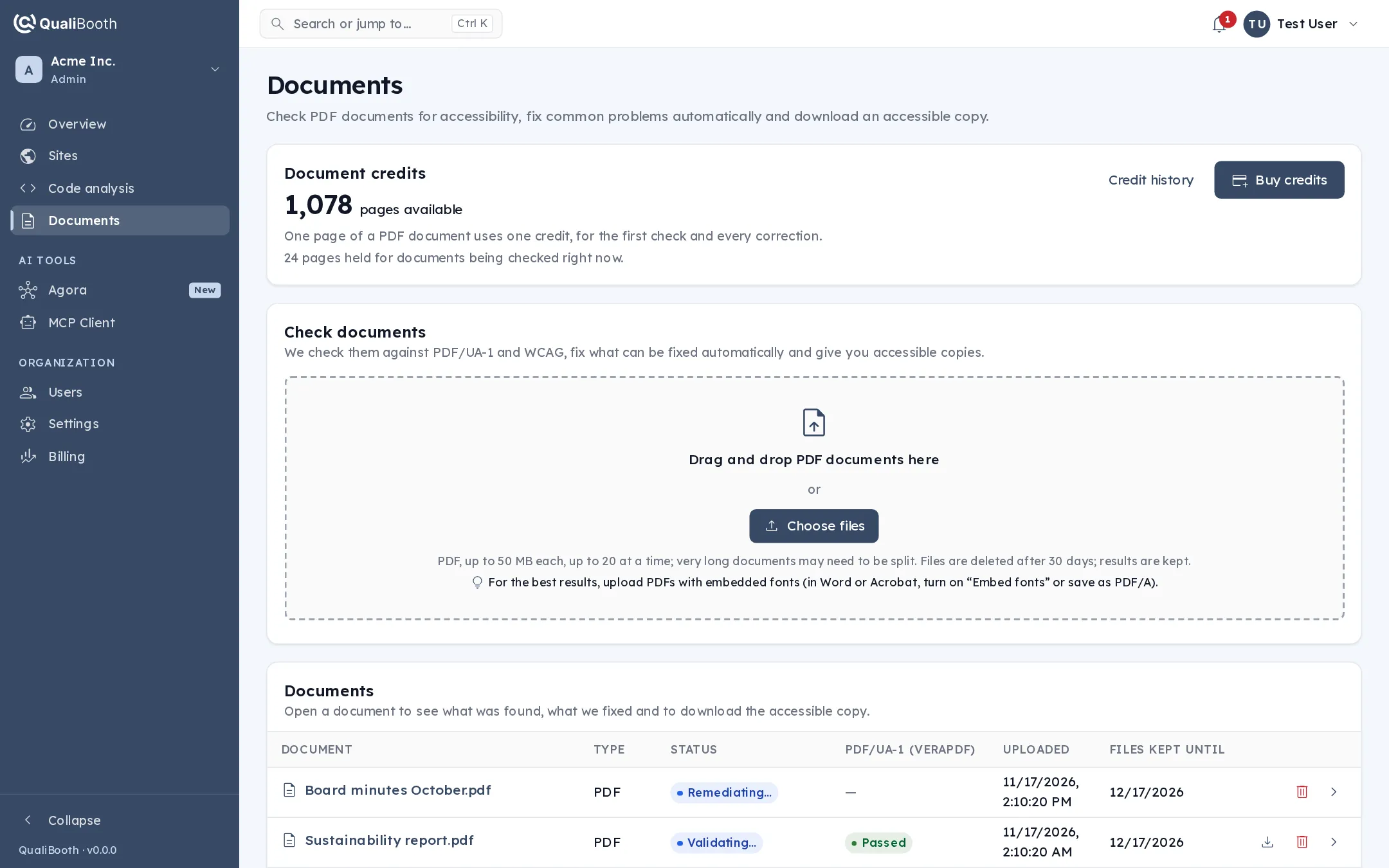
How it works
Accessible PDFs in four simple steps
QualiBooth combines AI-powered remediation with automated accessibility validation, so improving a PDF takes minutes instead of days.
- 01
Upload your PDF
Drag your document into the QualiBooth platform. No special software, plug-ins or technical expertise required.
- 02
Analyze accessibility
QualiBooth checks the original against PDF/UA and the WCAG criteria that apply to documents - structure, reading order, alternative text, language and more.
- 03
AI-powered remediation
Our remediation engine fixes supported issues automatically, rebuilding the document structure assistive technologies rely on.
- 04
Validate & download
The accessible copy is validated again, refined in further passes where needed, and ready to download with its report.
Continuous improvement through iterative validation
QualiBooth goes beyond a single remediation pass. Every round of fixes is checked again, and the engine keeps working on whatever remains - so the copy you download has been proven, not just processed.
What QualiBooth remediates
Automatically fix common PDF accessibility issues
AI-powered analysis and remediation address the barriers that make PDFs hard to navigate, understand and use with assistive technologies.
-
PDF tags & structure
Identifies and corrects the tags for headings, paragraphs, lists and other content, building the structure tree screen readers navigate by.
-
Reading order
Establishes a logical reading sequence, so assistive technologies announce content in the order a sighted reader would follow.
-
Alternative text for images
Writes meaningful descriptions for informative images and charts, and marks purely decorative images so they are skipped.
-
Tables & headings
Repairs heading hierarchy, table structure and header associations for clearer navigation and interpretation.
-
Document metadata
Sets the document language, title and the accessibility properties a PDF/UA document has to declare.
-
Accessibility validation
Checks every remediated copy against PDF/UA and WCAG, and flags anything that still needs attention.
Clear, verifiable results
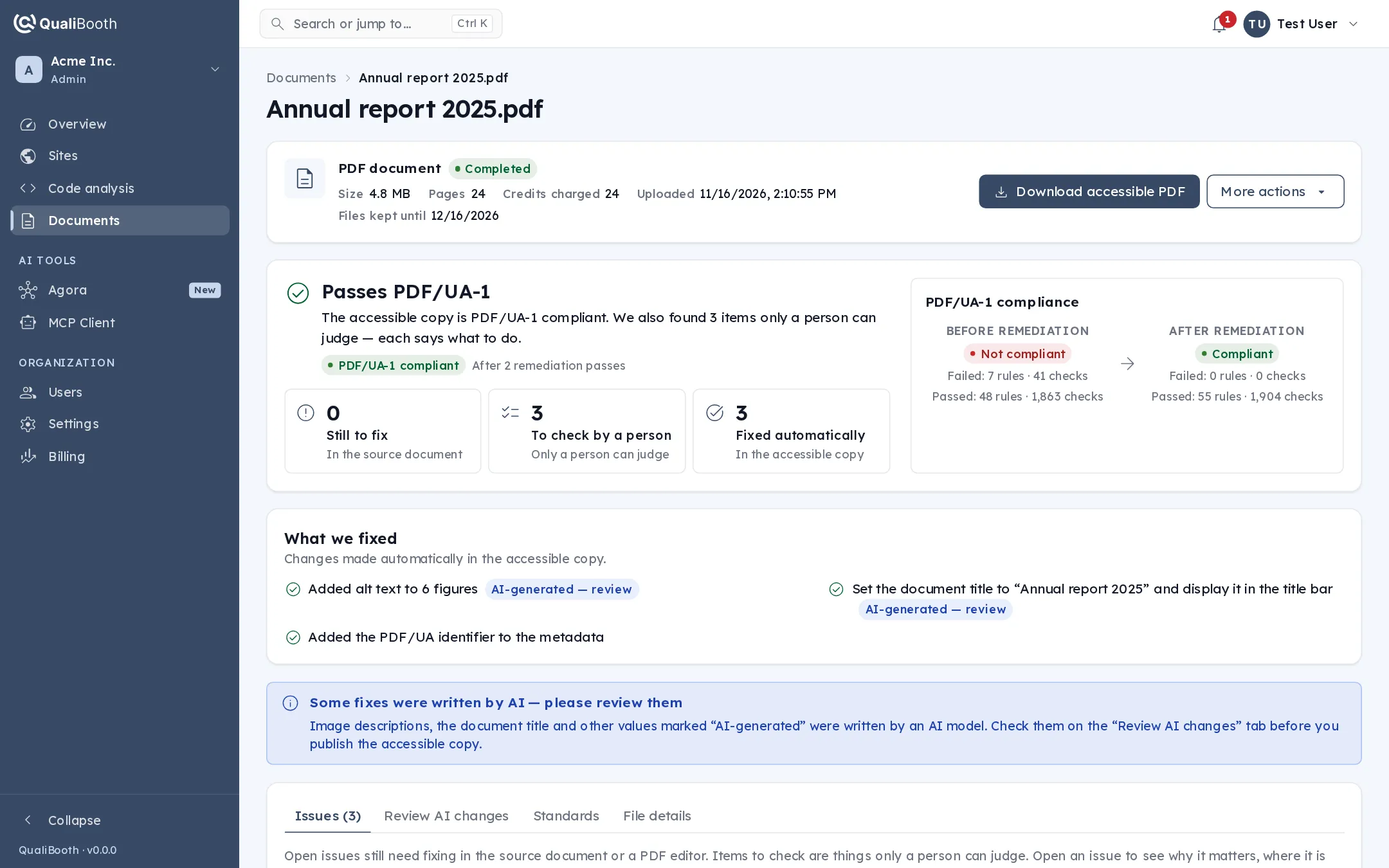
See exactly what changed - before and after
Every document gets a result page you can share with auditors, legal teams and procurement. No black box: you see the verdict, the evidence and every fix.
- A PDF/UA-1 verdict for the accessible copy, measured with veraPDF, side by side with the original.
- Every fix listed, with the issues still open and the items a person should confirm.
- Results mapped to WCAG 2.2 AA, Section 508, EN 301 549 and PDF/UA-1.
- A shareable PDF report and a full machine-readable JSON export.
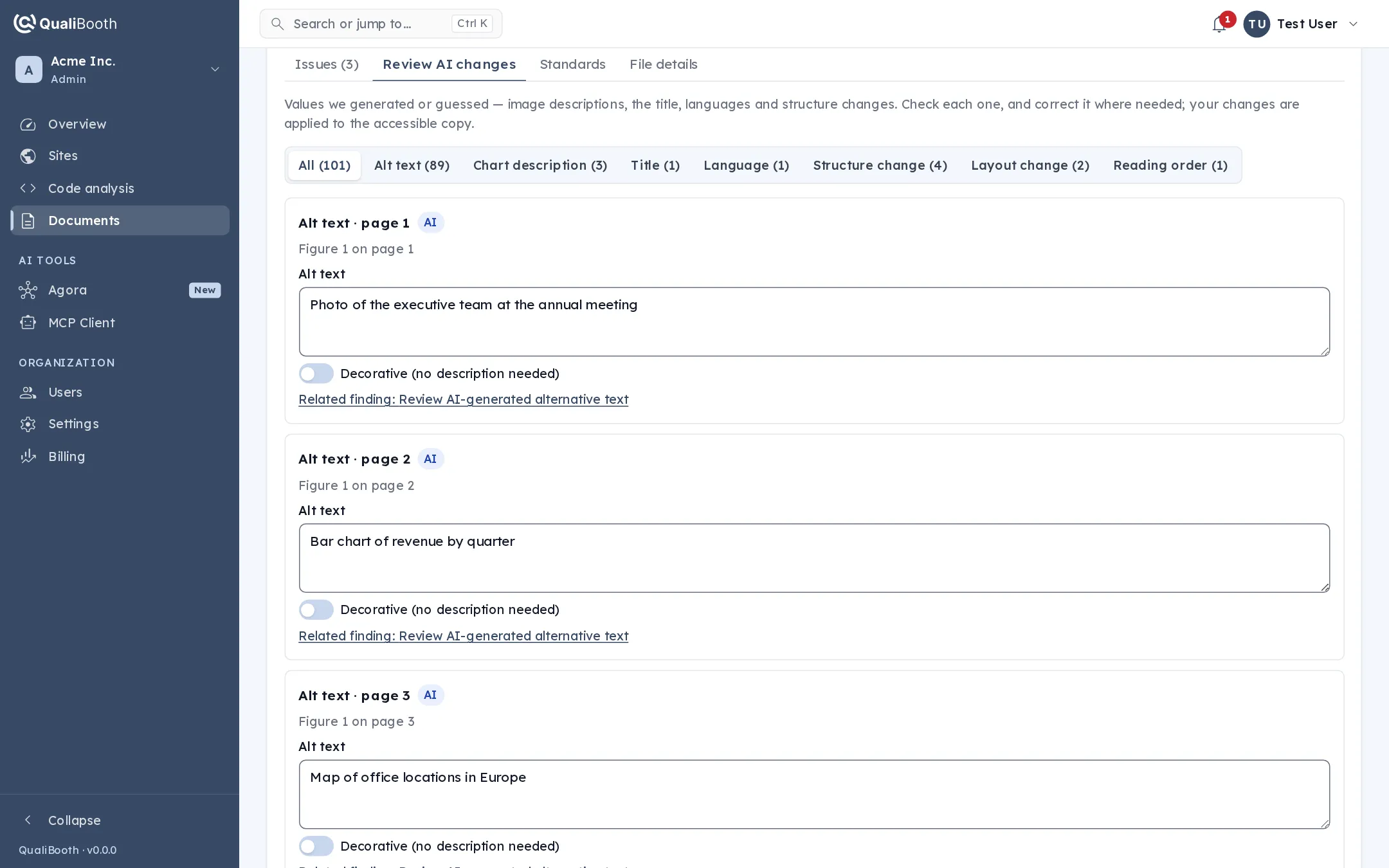
You stay in control
Review every AI-written value. Correct it in one click.
Image descriptions, chart summaries, form labels, the title and the language are collected in one review list. Edit anything that is not quite right, save, and QualiBooth applies your changes and validates the document again.
Backed by our accessibility team
Some documents are too complex for automation alone. When that happens, the document is not marked as failed: our accessibility specialists review and finish it by hand, typically within 24 to 48 hours, at no extra cost. You can download an interim copy in the meantime.
Why choose QualiBooth
Smarter, faster PDF accessibility remediation
Traditional PDF remediation means quotes, queues and document-by-document manual work. QualiBooth replaces it with a platform you control.
-
Automated PDF remediation
Reduce manual effort by identifying and fixing supported issues automatically - no waiting on a service engagement for every document.
-
Iterative accessibility validation
Remediation and validation run in repeated passes, so remaining issues are found and resolved instead of shipped.
-
Scalable, self-service solution
Upload, remediate and validate on demand, from a single brochure to your whole document library, whenever your team needs it.
Standards
Built around PDF accessibility standards
QualiBooth identifies and addresses issues against the standards and regulations your documents are measured by.
- WCAG 2.2
WCAG 2.2
Addresses the Web Content Accessibility Guidelines criteria that apply to documents, including structure, text alternatives and navigation.
- ISO 14289
PDF/UA
Validates against PDF/UA-1 (ISO 14289-1), the technical standard for tagging, reading order and assistive-technology compatibility.
- § 508
Section 508
Helps organizations meet the PDF requirements of Section 508 of the U.S. Rehabilitation Act.
- EN 301 549
European Accessibility Act
Supports EAA readiness by improving the accessibility of the documents you publish, mapped to EN 301 549.
An honest note on compliance
Automated remediation and validation significantly improve PDF accessibility, but no automated tool can guarantee full compliance with every requirement. Some judgements - like whether a description is accurate - need a person, which is why QualiBooth shows you what to review and backs complex documents with expert review.
Simple, credit-based pricing
Flexible PDF remediation pricing
Pay only for the PDF pages you process. Buy credits when you need them and remediate documents whenever you like.
-
1 credit = 1 PDF page
A 10-page PDF uses 10 credits. Credits are only charged when processing finishes; if it fails, they go straight back to your balance.
-
Flexible credit packages
Choose a package in the QualiBooth Portal - larger packages cost less per page. Purchased credits never expire.
-
No manual service engagements
No quotes, no statements of work, no waiting. Larger volumes can be arranged with our sales team and paid by invoice.
Frequently asked questions about PDF remediation
- What is automated PDF remediation?
- Automated PDF remediation identifies and corrects accessibility issues in PDF documents with software, instead of relying entirely on manual editing. QualiBooth uses AI-powered analysis and remediation to fix document structure, reading order, alternative text and other accessibility elements, so PDFs work for people who rely on screen readers and other assistive technologies.
- How does AI-powered PDF remediation work?
- QualiBooth analyzes the uploaded PDF to find accessibility issues, and its remediation engine applies the supported fixes. The updated document is then validated again and refined in further passes where issues remain. When processing is complete, you download the accessible PDF together with its report.
- Can QualiBooth remediate scanned PDFs?
- Scanned PDFs contain images of text rather than real text, so they first need text recognition (OCR) and structure before they can be made accessible. QualiBooth recognises scanned documents and handles them as part of the same workflow; when a document needs more than automation can deliver, our accessibility team completes it.
- Does remediation change how my document looks?
- Remediation works on the structure underneath the page - tags, reading order and properties - so the visual design is preserved. Because every PDF is built differently, we still recommend a quick look at the accessible copy before you publish it.
- Does QualiBooth validate PDFs against WCAG and PDF/UA?
- Yes. Every original and every accessible copy is checked against PDF/UA-1 with veraPDF, the industry-standard validator, together with the WCAG criteria that apply to documents. Automated validation cannot judge everything - such as whether alternative text is accurate in context - so those items are listed for a person to review.
- Can automated PDF remediation guarantee full compliance?
- No automated solution can guarantee full compliance for every document, and we will not claim otherwise. QualiBooth fixes and verifies a large share of issues automatically, shows you exactly what still needs human judgement, and has our accessibility team finish documents that automation cannot.
- How much does PDF remediation cost?
- QualiBooth uses flexible, credit-based pricing: each processed PDF page uses one credit. Credits are bought in packages directly in the QualiBooth Portal, larger packages cost less per page, and purchased credits never expire. For large volumes, contact our team about a custom package.
- Can I remediate many PDF files?
- Yes. Each document is analyzed, remediated and validated through the same automated workflow, and you can process as many PDFs as your credits allow. Organizations with large document libraries or recurring volumes can talk to us about volume options.
Make your PDFs accessible with AI
Stop spending days on manual PDF fixes. Let QualiBooth identify, remediate and validate accessibility issues, so your team can focus on publishing inclusive content.
AI-powered remediation. Automated validation. Flexible, page-based pricing.